Make something
Bongo Cat
Bongo Cat turns your keyboard into a tiny band, with a cartoon cat playing bongos, piano, marimba and percussion as you press the keys. Tap out a rhythm, try a melody, or interrupt everything with a meow.
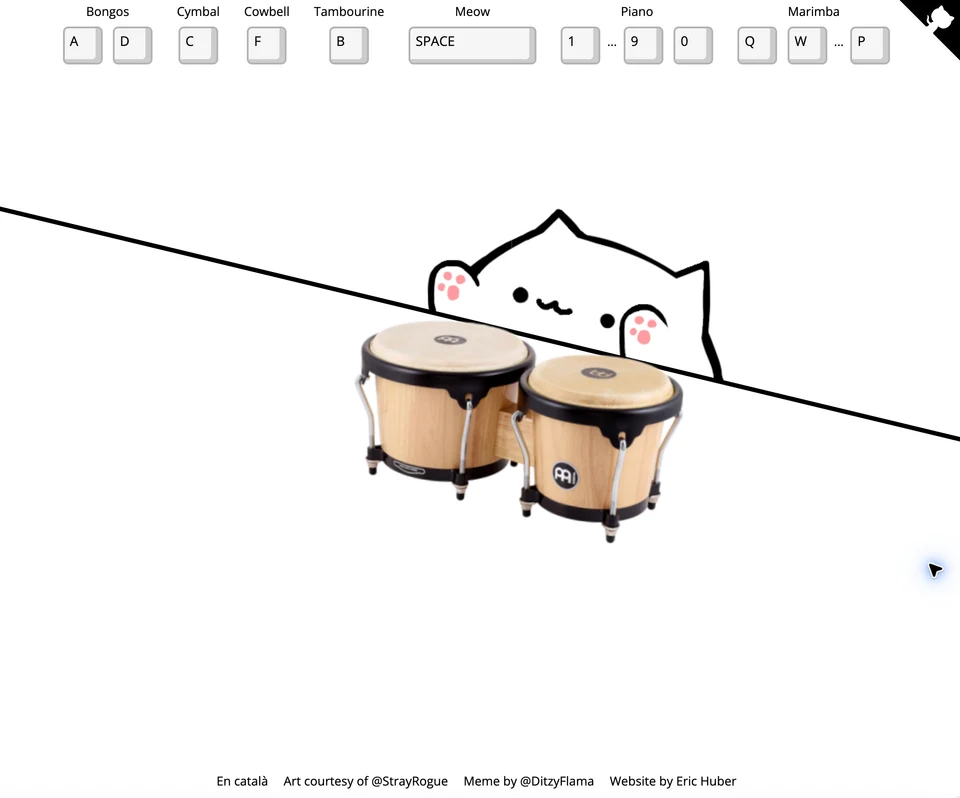
Bongo Cat with its bongos and keyboard controls for the other instruments.
- Cost
- Free
- Devices
- Computer and phone
- Computer controls
- Keyboard
- Sound
- Essential
- Website creator
- Eric Huber
What is Bongo Cat?
Bongo Cat is a browser music toy where keyboard presses trigger instruments and the cat’s playing animation. The instrument changes automatically when you use its assigned keys, so you can move from percussion to a melody without opening a menu.
There is no song you have to complete or score to chase. It is a small collection of sounds to play with, built around the Bongo Cat meme. The website credits Eric Huber for the site, StrayRogue for the cat artwork and DitzyFlama for the meme.
Which keys play each instrument?
The controls are displayed across the top of the desktop page. Start with A and D for a two-handed bongo rhythm, then add another sound.
- Bongos: A and D.
- Cymbal: C. Cowbell: F. Tambourine: B.
- Meow: Space.
- Piano: the number row, 1 through 9 and 0.
- Marimba: Q through P across the top letter row.
What should you try first?
Alternate A and D for a steady rhythm, then drop in a cymbal hit with C. The number row gives you piano notes when you want to try a melody instead. Switching to Q, W and E changes the instrument to marimba.
There is no need to compose anything impressive. A few taps are enough to understand the joke, and the piano and marimba give you something more to do after the first bongo flourish.
What should you know before playing?
It opens directly in the browser without requiring an account or installation. Sound is the point, so check your volume or use headphones before starting.
The desktop shortcuts follow the letters shown on the page. This is an informal instrument toy rather than a guided music lesson: it does not walk you through songs or judge your timing.
On a phone, use the on-screen controls to play. You do not need to connect a keyboard; the keyboard shortcuts above are for computer play.
What we like about Bongo Cat
We like how little explanation separates opening the page from doing something. The controls sit above the cat, and pressing a key swaps in the relevant instrument. Piano and marimba make it more than a two-button drum joke.
The straight-faced presentation helps: a simple line-drawn cat, photographed instruments and a whole keyboard to make a racket with. The dedicated meow key is exactly the sort of unnecessary feature that belongs here.
Site operated by Eric Huber.
Find it in Make something