Make something
Pink Trombone
Pink Trombone lets you make a synthetic voice by dragging a tongue around a cartoon mouth and changing the pitch of its voicebox. It turns the mechanics of speech into a hands-on sound toy, with no microphone or account needed to get started.
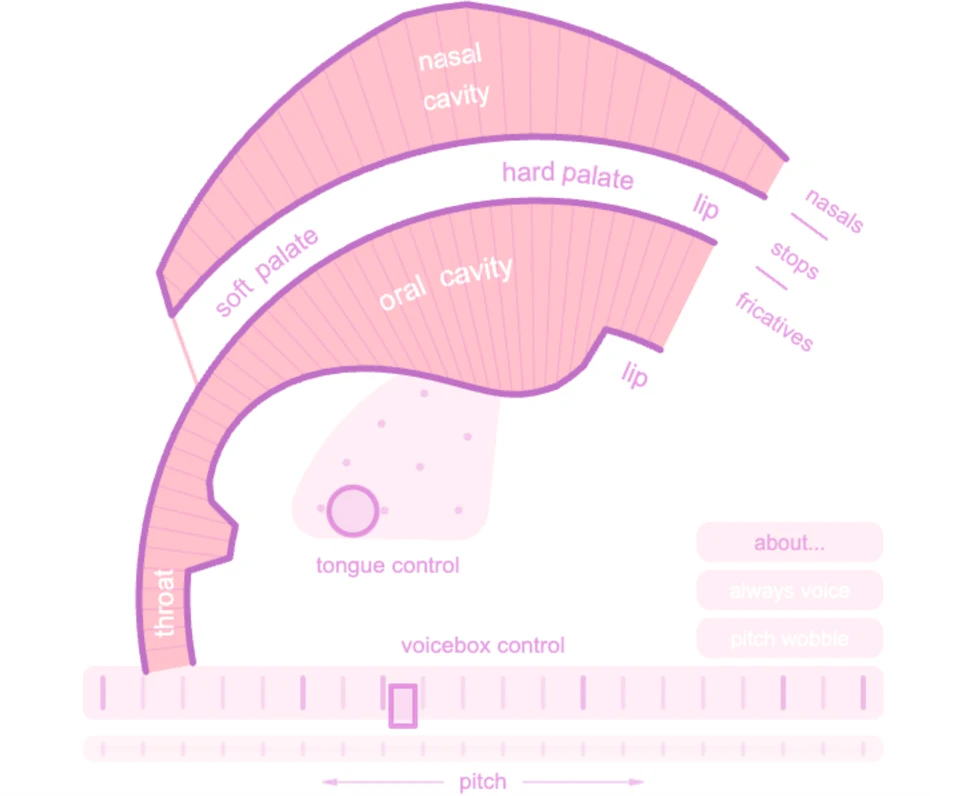
Pink Trombone’s vocal-tract diagram, tongue control and voicebox slider.
- Cost
- Free
- Devices
- Computer and phone
- Controls
- Drag the tongue and voicebox
- Sound
- Central to the experience
- Creator
- Neil Thapen
What is Pink Trombone?
Pink Trombone is an interactive vocal-tract synthesizer by Neil Thapen. A diagram of the throat, mouth and nasal cavity doubles as its controls: changing the shape changes how the generated voice is formed. Instead of typing words or speaking into a microphone, you manipulate the parts that shape speech.
The voicebox supplies the initial sound, while the tongue and openings in the model shape it into different vocal sounds. There is no score or sequence to finish. The point is to experiment with those relationships.
How do you make your first sounds?
Start with your volume low, then click or tap past the title screen. Try changing one control at a time so the effect is easier to follow.
- Drag the circle in the tongue-control area. Watch the oral cavity change shape as you explore different vowel positions.
- Move the voicebox control left or right to change the pitch. The voicebox also controls the intensity of the initial sound.
- Use the “always voice” and “pitch wobble” switches to experiment with sustained voicing and variation in pitch.
- Open “about…” for the built-in instructions. Its RESET link restores the starting setup.
Can you make consonants as well as vowels?
Yes. The creator’s instructions explain how touching the oral cavity narrows it to form fricative consonants, while touching above it closes the passage for stop consonants. Touching the nasal cavity opens the connection that lets sound flow through the nose.
These controls make more sense after you have spent a moment with the tongue and pitch. Treat them as things to explore rather than expecting to produce fluent speech immediately.
What should you know before trying it?
It runs directly in the browser and generates its own sound. You do not need to record your voice or grant microphone access. Sound is the main reason to use it, so this is one to save for headphones if you are somewhere quiet.
The interface relies on dragging a visual diagram. It is not a conventional keyboard instrument or a text-to-speech box, and the anatomical labels can look more complicated than the first interaction actually is. The “about…” panel is a useful guide if you want to go beyond moving the tongue.
It also works on a phone: use your finger to move the tongue and voicebox and change the sound. The same diagram serves as the touch interface.
What we like about Pink Trombone
We like that the mouth diagram is the instrument itself. Moving the tongue visibly reshapes the passage, so even before you understand the labels, you have something concrete to experiment with.
It is a good fit for a few minutes of curiosity: a small set of controls with a surprisingly specific idea behind them. You can approach it as a speech demonstration or simply enjoy the absurdity of playing a disembodied mouth.
Site operated by Neil Thapen.
Find it in Make something