Draw & create · Physics & satisfying
Pixel Art Community
Pixel Art’s community picture lets you color by number alongside other people, filling in one shared image square by square. Pick a color, zoom in and paint a little patch while the picture grows around you. It is free to join in your browser, with no account or registration required.
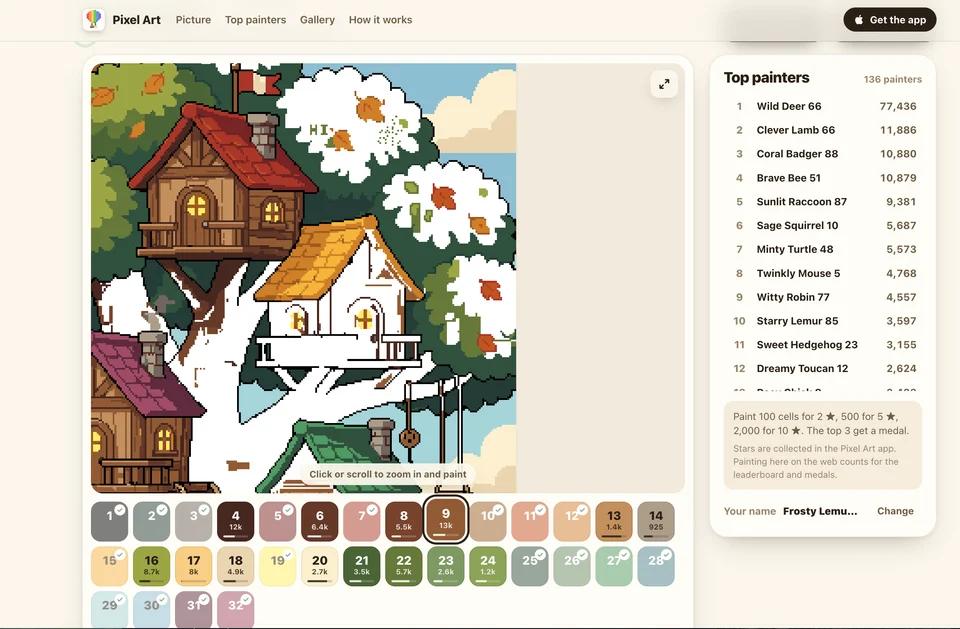
A community picture taking shape, with finished colors checked off in the palette.
- Cost
- Free community picture in the browser
- Account
- No account or registration required to paint
- Devices
- Computer and phone
- Activity
- Live cooperative color-by-number
- App
- Optional; not needed for the community picture
What is Pixel Art Community?
It is a shared online coloring picture from ItsArt Studios. Each tiny square has a number that matches a color in the palette. Everyone works on the same image, so you can fill a small section while other painters work elsewhere on the board.
There is no need to plan a drawing or be good at art. The pleasure is in clearing a patch of numbered squares and zooming out to see what you have helped make. You can contribute a few cells and leave without taking responsibility for finishing the whole picture.
How do you paint the picture?
Zoom in until the numbers appear, select a color and click or tap squares with the matching number. The selected color’s unfinished squares are tinted, making them easier to find. Completed colors receive a check mark in the palette.
Drag to move around the picture and scroll or pinch to zoom. For a longer stretch of painting, the site supports pressing and holding before dragging; on a computer, Shift and drag is another option. “Find a spot” is particularly useful when you cannot see where your selected color is still needed.
On a computer, the arrow keys pan, plus and minus zoom, and 0 returns to the whole picture. That last shortcut is a nice way to see how much has changed while you were working on one corner.
Are you painting with other people?
Yes. This is one live community picture, rather than separate copies for each visitor. We could see unfinished areas filling in and the painter totals changing while we worked. There is an Invite friends button if you want someone else to join you.
The Top painters board counts contributions under nicknames. The page gives you a name automatically, with an option to change it. You can ignore the rankings and simply help out; there is no need to chase the people filling thousands of squares.
When the last square is painted, the site says the finished image moves into the gallery and the next picture starts. You can browse earlier completed pictures below the canvas.
Do you need an account or the Pixel Art app?
No. You can open the community page and paint without registering, providing an email address or installing anything. The app promotions do not prevent you from using the browser picture.
The distinction is in the rewards and saving: the page says web painting counts toward its leaderboard and medals, while stars are collected in the Pixel Art app. It also says your web name and painted-cell record stay in that browser and are separate from the app. Do not expect a browser session to transfer automatically to another device or the app.
Does it work on a phone?
Yes. Zooming, choosing colors and painting squares work on a phone. Pinch in until individual cells are easy to tap, then move around the picture with a drag. A computer gives you a larger view, but the basic activity suits a short phone break too.
What we like about Pixel Art Community
We like the feeling of making a small contribution to a much bigger picture. A patch that looked unfinished a moment ago can be colored in when you look back, and that gives a familiar color-by-number activity a reason to feel alive.
The low commitment helps. There is no registration to get through and no blank canvas demanding an idea. Pick a color, tidy up a little corner and see what everyone else has done. The leaderboard adds competition if you want it, but the shared picture is the better reason to stay.
Site operated by ItsArt Studios.
Find it in Draw & create · Quick · Physics & satisfying · With friends · Mobile-friendly