Explore somewhere else
TinyRJ
TinyRJ lets you explore a miniature Rio de Janeiro by plane, hang glider, boat or bicycle, or simply browse its interactive map. Search for neighborhoods, zoom in on the beachfront and pick out landmarks before taking the controls.
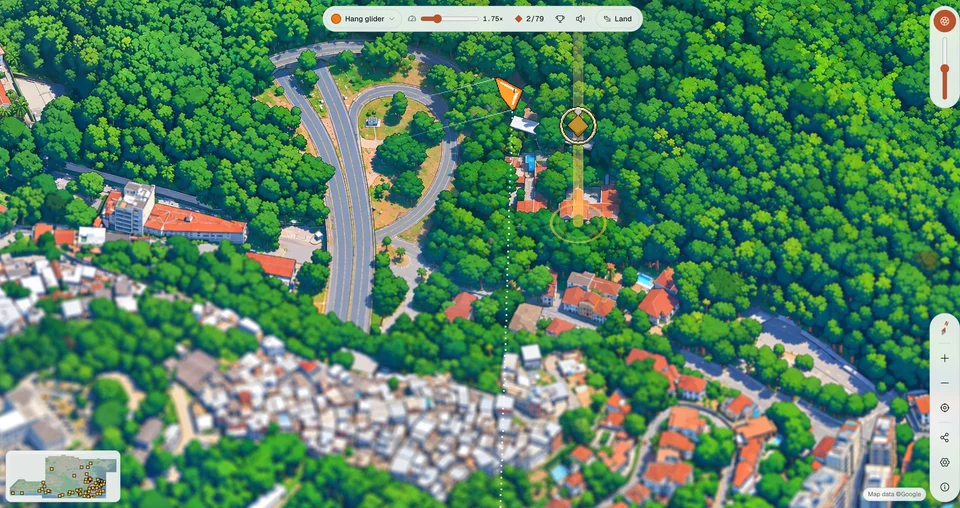
Hang-gliding above TinyRJ’s miniature Rio.
- Cost
- Free to explore and play
- Devices
- Computer and phone
- Account
- No sign-up needed to explore or play
- Language
- English and Portuguese
- Creator
- @xthomasms
What is TinyRJ?
TinyRJ is an interactive, isometric map of Rio de Janeiro with flying, boating and racing modes built into the city. Drag and zoom to explore its illustrated beaches, neighborhoods and green hills, or switch to a vehicle to move through the scenery. You can fly above the rooftops, steer a jet ski across the water or race a bicycle along the promenade.
Start with Copacabana or Sugarloaf Mountain in the landmark strip. Selecting a landmark opens a short information card. The search box also finds neighborhoods, streets and places, so you can follow a familiar name rather than wander at random.
What do Fly, Boat and Race do?
Fly puts a small aircraft over the map. We especially liked switching from a biplane to a hang glider: it turns looking at the scenery into moving through it, without needing to learn a full flight simulator. Open the aircraft selector for the available craft and controls.
- Flight: use left and right arrows to turn. The hangar lists additional controls for climbing, speed and maneuvers. Land returns you to the map.
- Boat: choose a jet ski or speedboat. Up and down control throttle and reverse; left and right steer. The jet ski also has a Space-key jump control.
- Race: choose a bicycle or e-scooter for the Avenida Atlântica course. Up pedals or accelerates, down brakes, and left and right steer. Space sprints, Shift skids and R restarts. A time-trial option is also available.
How do you move around and share a place?
Drag to move the map and scroll or use the plus and minus buttons to zoom. The minimap helps you jump across the city. The whole-map button, also available with the 0 key, brings the wider view back into frame.
Share this spot copies a link containing the current map position and zoom. It is useful when you find a corner of the city you want someone else to see. Settings includes the language selector and options for the minimap and neighborhood boundaries.
Can you use TinyRJ on a phone?
Yes. You can explore the map and use the Boat, Fly and Race modes on a phone. Drag to move around and pinch to zoom. A computer gives the detailed map more room and lets you use the keyboard shortcuts listed in each mode.
What should you know before exploring?
Some regions and landmarks are still marked Soon. Treat TinyRJ as a growing place to explore rather than a promise that every part of greater Rio is already illustrated.
The tilt-shift effect blurs parts of the view to emphasize the model-city look. We like the atmosphere it adds, but turning it off makes the map easier to inspect. Use the tilt-shift control or D on a keyboard.
The moving camera in the vehicle modes is quite different from browsing the stationary map. If that is uncomfortable, stick with dragging and zooming at your own pace.
What we like about TinyRJ
We like that the map and the toys belong together. Flying over the rooftops or skimming past the coast gives you another reason to look at a city that was already worth exploring. You can spend a few minutes finding a landmark or let the scenery turn a short visit into a longer detour.
Site operated by @xthomasms.
Find it in Explore somewhere else