Games
Viper One One
Viper One One lets you fly a fighter jet over real-world terrain in your browser, with cockpit and outside views, a shared sky and combat challenges. It is free to play, and you can fly with a keyboard or phone touch controls.
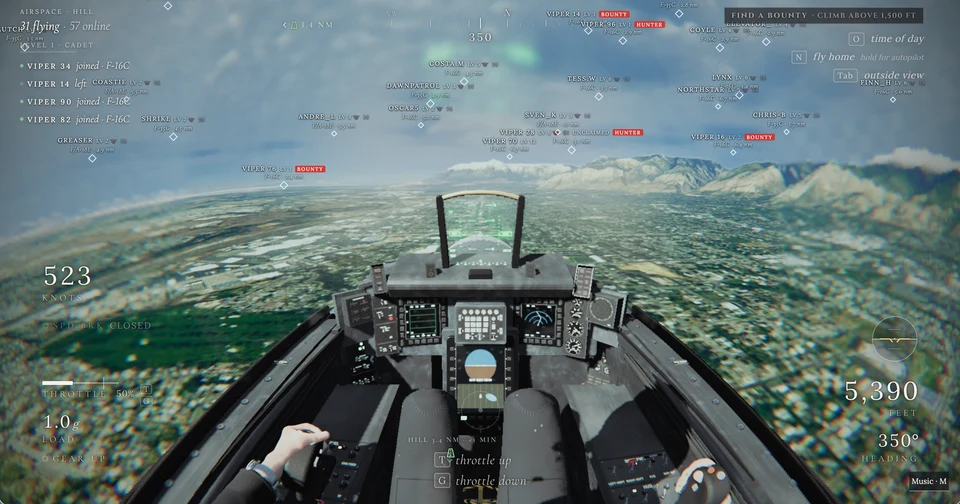
Viper One One in cockpit view above mountainous terrain, with other pilots marked in the shared airspace.
- Cost
- Free to play
- Devices
- Computer and phone; older phones may struggle
- Controls
- Keyboard or touch; additional controller support is documented by the creator
- Play
- Flight challenges and shared multiplayer airspace
- Download
- Runs in your browser
What is Viper One One?
Viper One One, also styled VIPER 11, is a browser flight game built around fighter jets. You control the aircraft, manage its throttle and switch between looking out of the cockpit and watching it from outside. The terrain gives you somewhere to fly, rather than simply serving as a backdrop.
The current site offers the F-16, F-35C and Super Hornet, alongside missions and dogfights. You can start with the pleasure of flying before deciding whether you want a more competitive challenge.
How do you get started flying?
Give the game time to load, then use its tutorial and on-screen control prompts. Start by getting comfortable with steering, changing speed and switching views before tackling combat. There is more to learn here than in a one-button flying toy.
On a keyboard, T increases throttle and G reduces it. Tab switches to the outside view. The on-screen N prompt provides a way home, with a hold option for autopilot. Keeping those few controls in mind makes it easier to enjoy the scenery without feeling lost.
Is it just flying, or is there combat too?
There is a shared multiplayer sky as well as combat missions and ranked one-on-one dogfights. The pilot labels visible around you help make the airspace feel occupied. These are different reasons to return: getting more comfortable with the aircraft, taking on a challenge, or flying with other people around.
If you mainly want the view, begin with flying rather than treating combat as the whole point. The cockpit perspective and the change of scale as you climb are already a substantial part of the appeal.
Can you play Viper One One on a phone?
Yes. Touch controls let you fly on a phone, and steering, throttle and changing views also work on a computer. Older phones can struggle, so a newer device is a better choice for this one.
A computer gives the instruments and control hints more room. If the game runs poorly on your phone, it is worth trying on a computer before giving up on it. Do not expect the same performance across devices.
How realistic is it, and what should you know?
Think of it as an approachable flight game with a convincing cockpit atmosphere. The creator documents assists and deliberate simplifications, including automatic flight-path holding and a fixed aircraft weight. It is not a substitute for flight training or a reason to expect every real aircraft procedure to be simulated.
The wide cockpit view, rapid turns and moving horizon can be uncomfortable if you are sensitive to motion. Start gently rather than immediately throwing the aircraft around.
What we like about Viper One One
The cockpit is the hook. You get a strong sense of sitting inside an aircraft, with the landscape stretching away beyond the instruments. Switching outside gives you a different view of the same flight rather than making the cockpit feel like a decorative frame.
We like that it leaves room to learn. A first visit can be about staying in control and enjoying the view; the missions and other pilots give you something to investigate afterward. The trade-off is that this is a more demanding distraction, both for your device and your attention, than a quick tap-and-go toy.
Site operated by apek.
Find it in Games · Mobile-friendly