Rabbit holes
Windows93
Windows93 lets you explore an imaginary computer full of games, strange programs and desktop jokes, all inside your browser. Open an icon and you might find a familiar card game, a text animation or an error dialog that refuses to leave quietly.
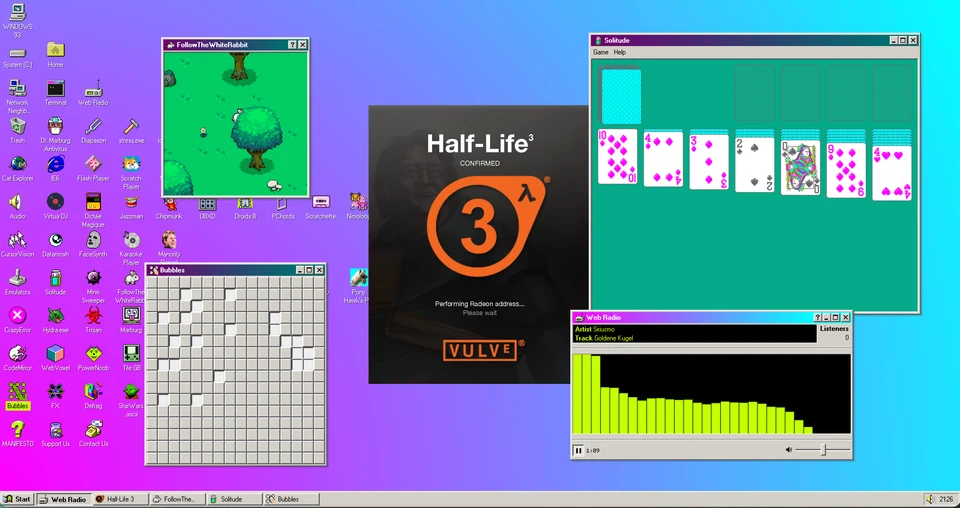
Windows93’s desktop with games, web radio and its fictional Half-Life 3 joke open.
- Cost
- Free to explore
- Devices
- Computer and phone; more room on a computer
- Installation
- Runs in your browser
- Creators
- Jankenpopp and Zombectro
What is Windows93?
Windows93 is an interactive website dressed as a fictional operating system. Its desktop, Start menu, taskbar and windows hold a collection of games, creative tools and deliberately strange programs. Open icons, switch between windows and follow whatever catches your attention.
The name is part of the joke: this is an independent art project by Jankenpopp and Zombectro, not a Microsoft Windows release. You visit it as a website rather than installing an operating system.
What should you try first?
The crowded desktop is easier to enjoy when you have a few places to begin. Try these before opening everything at once:
- Solitude: a solitaire-style card game. Click the face-down deck to deal a card.
- MineSweeper: the familiar grid of hidden mines. Reveal squares, use right-click to flag one on a computer, and click the face to start a new game.
- StarWars.ascii: an animated version of Star Wars rendered in text characters. It is a good example of the old-web curiosities tucked among the programs.
- Hydra.exe: a fake error dialog that multiplies when you dismiss it. One becomes two, so repeated clicks are part of the problem.
How do you open programs and clear the desktop?
On a computer, double-click a desktop icon to open its program. Familiar window buttons let you close or minimize ordinary apps, and the taskbar helps you find open ones. Some programs deliberately play with those expectations.
If Hydra or another experiment leaves the desktop in a mess, open Start and choose Reboot. This restarts the imaginary desktop inside the page, not your actual computer. Do not confuse closing a prank dialog with stopping its joke: Hydra creates more dialogs when you dismiss it.
Does Windows93 work on a phone?
Yes, you can open programs and use the windows on a phone. A computer is our preferred way to explore because the desktop has lots of small icons and overlapping windows; some individual games also use keyboard or right-click controls.
You can explore the desktop without granting camera access. Apps such as FaceSynth use a camera, so skip those if you do not want that kind of interaction. The collection also includes sound and moving visuals, so start with your volume low if you are browsing somewhere quiet.
What we like about Windows93
The fun comes from recognizing the interface but not knowing what each icon will do. Dealing a card in Solitude feels ordinary enough; a few clicks later, Hydra is filling the same desktop with nonsense. The contrast gives it more personality than a page of unrelated links.
We like having room to wander without a score or prescribed route through the whole site. Start with something familiar, try an odd-looking icon and keep the Reboot option in mind. It suits curiosity more than completion.
Site operated by Jankenpopp and Zombectro.
Find it in Rabbit holes