Games · Explore somewhere else
Bonvo Ride
Bonvo Ride is a free browser skiing and snowboarding game built around real ski resorts. Pick a mountain, choose a run and steer downhill through its 3D terrain. The attraction is having an actual place to explore, whether you recognize the resort or just want to see what is over the next ridge.
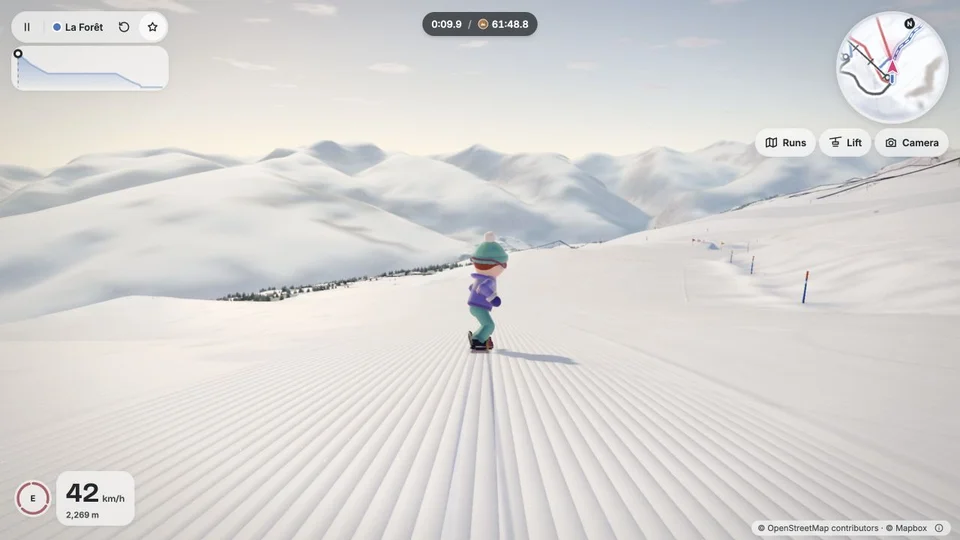
Snowboarding at Paradiski in Bonvo Ride.
- Cost
- Free browser game
- Devices
- Computer and phone
- Controls
- Keyboard on computer; touch controls on phone
- Account / download
- Neither needed to start riding
- Sound
- Optional
- Connection
- Internet needed to load terrain
Why ride a real resort?
Choosing the mountain is part of the fun. You might look for somewhere you have skied, a place you would like to visit, or simply a run with an inviting shape. That gives the wandering a little purpose before you start worrying about the clock.
The slopes stretch out around a small, cartoon-like rider. We found it more inviting to pick an easier run and get used to carving than to start by chasing a fast time. There is room to enjoy the scenery between mistakes.
How do you choose a mountain and start a run?
Use the resort choices on Bonvo’s site, then select Ride. Inside the game, Runs opens a map and a searchable list of slopes. Difficulty filters help narrow the choice. Select a run and press Ride it to start from the top against the clock.
The game also offers freeriding. To change mountains from a ride, pause, open More and choose Change resort. Bonvo advertises more than 6,000 resorts; the available runs depend on its map coverage.
How do you steer, jump and restart?
On a computer, use the left and right arrow keys to steer, Up to tuck or push along a flat, and Down to brake. Hold Space and release it to jump. Shift grabs in the air, and E gives a boost.
Camera changes your view, which is useful if the current angle makes the slope difficult to read. Retry run starts the attempt again. Pause lets you stop, change runs or mute the sound.
On a phone, use the on-screen stick to steer, tuck and brake. Hold and release JUMP to jump. We recommend starting with steering and braking before trying spins and grabs.
How closely does it recreate the real mountain?
Bonvo uses elevation data for the terrain and OpenStreetMap data for runs and lifts. Trees, rocks and snow are generated. This makes the location meaningful without making every visible detail a reconstruction.
Treat it as a game set on mapped terrain, rather than a promise that a familiar slope will look or feel exactly right. Perspective, scenery and game movement all affect that impression.
Can you challenge a friend?
The More menu offers Send a challenge for a timed run, plus a separate Race friends mode advertised for up to eight riders. A shared time challenge gives someone the same slope and a target to beat; live racing is a different option.
Do you need the Bonvo app or an account?
No. You can open the browser game and ride without signing up, installing the app or paying. The separate Bonvo Ski app provides ski-map features, including offline maps; it is not required for the browser game.
The game needs an internet connection to load its terrain. Bonvo’s cookie notice says game results stay on the device for one year and analytics cookies are optional. Declining those cookies still lets you ride.
Site operated by Bonvo Consulting Kft..
Find it in Games · Explore somewhere else
More landscapes to explore
Fly a paper plane through Glider, or reshape the coastlines of a globe in Sliding Shores.

Glider
Fly a paper plane, race through gates or earn points with close passes.

Sliding Shores
Raise or drain the oceans and watch the coastlines change on a 3D globe.