Games
Perfect Cut
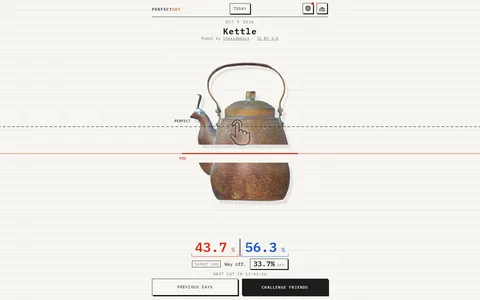
Perfect Cut is a free daily browser puzzle about cutting a 3D object into the right proportions. Turn it around, decide where the line should go and commit to a slice. The result tells you how far your estimate was from the target.
- Cost
- Free to play
- Devices
- Computer and phone
- Main challenge
- One new object and target each day
- Controls
- Rotate the object, then draw a cut
- More to play
- Previous days with practice replays
- Account
- Not needed for the daily puzzle
Why try Perfect Cut?
A banana looks easy to divide until you have to decide how much of it is in the curve. Handles, spouts and uneven shapes make the same simple question surprisingly awkward: where should this cut go?
That is the whole attraction. You can understand the task immediately, turn the object around for a better look, and still be confidently wrong. Watching the pieces separate makes the result much more satisfying than a number on its own. It is a particularly good fit for a short break: one small decision, followed by a very clear answer.
How do you make a cut?
Read the day’s target first. It is not always an equal split. A target might ask for one tenth or a third of the object.
Drag to rotate the object, or use Views to inspect it from a fixed direction. Choose Make my cut when you have an angle you like. Draw a straight line across the object, then press Cut. Before committing, Clear removes the line and Turn it again takes you back to rotating.
On a phone, rotate and draw with your finger. The task is the same on a computer, using a mouse.
The result shows the two proportions and how far you missed the target. You are judging the amount of the 3D object on each side, so a line that divides its silhouette neatly may still leave very unequal pieces.
Can you keep playing after today’s cut?
Yes. Previous days opens an archive of earlier objects. Complete one and Try again starts a practice replay. The interface explains that practice does not replace your recorded result for that day.
This gives the game two useful rhythms: make your daily attempt and leave, or spend longer working out why an awkward object keeps fooling you. The next-cut countdown tells you when another daily challenge arrives.
What about friends and saving your record?
The Competitions menu offers a shared daily contest through an invitation link. Its rules award points according to how close each person gets to the target. Creating a competition asks for email confirmation; the ordinary daily puzzle does not.
According to the privacy notice, results are kept in browser storage and on the server under a random browser identifier. Saving your record with an email address lets you recover it on another device. Treat that as an optional account feature, not a requirement for trying the puzzle.
Find it in Games
Two more small challenges
Judge a wave in Tiltanic, or search a moving village in Where Is Mr. Kim.

Tiltanic
Rock the sea with your phone or mouse and carry a tiny boat past trouble.

Where Is Mr. Kim?
Find one man in a moving painting of a Korean village.